What is a Minecraft Skin Editor? Informational Blog 2025
Minecraft remains one of the most popular games in the world, loved for its creative freedom and limitless gameplay. Players can build, explore, and craft their own worlds — but what truly adds a personal touch is the ability to customize your character’s look with a Minecraft Skin Editor.
In this article, we’ll explain everything about Minecraft Skin Editors in 2025 — how they work, why they’re essential for expressing your style, and which tools are the best to use. Whether you’re searching for the best Minecraft skin editor online or want to design your own skin from scratch, this complete guide has you covered.
What is a Minecraft Skin Editor?
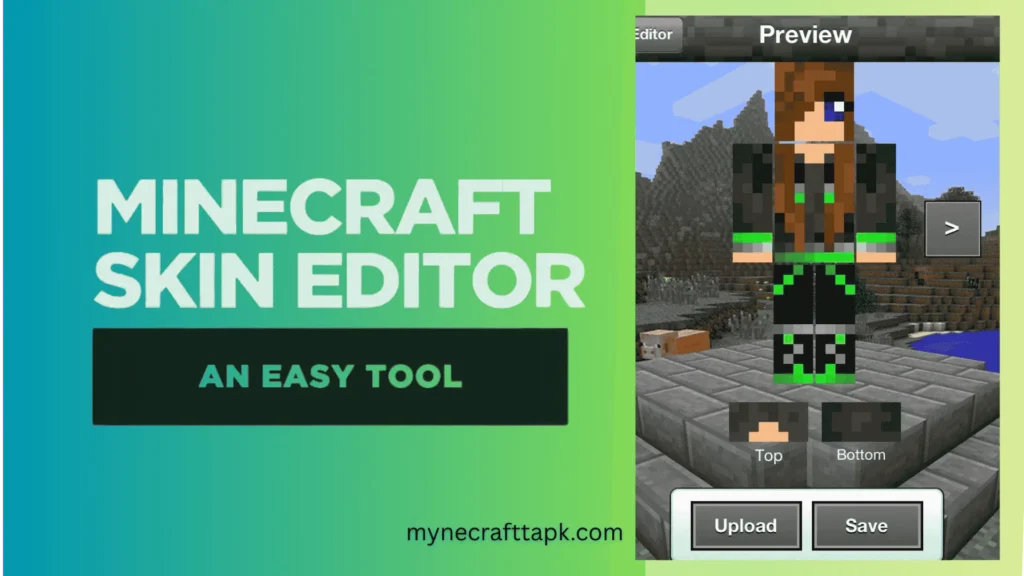
A Minecraft Skin Editor is a customization tool that allows players to design, edit, and personalize their Minecraft characters. Available both online and as downloadable software, these editors help you replace the default Steve or Alex with a custom Minecraft skin that showcases your creativity.With a skin editor, players can create anything—from realistic human avatars to fantasy creatures, superheroes, or even popular internet memes. Most modern editors include:
- A pixel-by-pixel canvas for detailed editing
- A 3D preview mode to see your skin in real time
- Easy import/export features for instant in-game use
- This makes it incredibly easy for anyone—even those with no artistic experience—to create a one-of-a-kind look
Why Use a Minecraft Skin Editor?
There are several reasons why a Minecraft Skin Editor is an essential tool for players:
- Self-Expression: Your skin represents your in-game identity. Whether you’re building, exploring, or battling in PvP, a unique skin adds personality and immersion to your gameplay.
- Stand Out in Multiplayer: On busy servers filled with hundreds of players, having a custom skin helps you stand out and be instantly recognizable.
- Cosplay and Roleplay: If you’re a fan of anime, movies, or comics, you can recreate your favorite characters directly inside your Minecraft APK world using a skin editor.
- Content & Branding: Streamers, YouTubers, and content creators often use custom skins as part of their visual brand, helping audiences recognize them instantly.
Top Minecraft Skin Editors in 2025
Here are some of the best Minecraft Skin Editor tools available today, each offering unique features:
1. Skindex (Minecraftskins.com)
Skindex is one of the best online Minecraft skin editors ,It features an incredibly easy-to-use interface, making it perfect for both beginners and advanced creators. You can start designing a skin from scratch or choose from thousands of community-created skins available in its massive gallery.
NovaSkin
NovaSkin is a feature-rich Minecraft Skin Editor that offers high levels of customization. It has a 3D real-time viewer and lets you preview your skin in various poses.
3. Tynker
Tynker offers a fun, drag-and-drop Minecraft skin editor perfect for young players. It also works with Minecraft Education Edition, making it great for classrooms and learning projects.
4. Minecraft Official Skin Editor (Minecraft.net)
Mojang now offers a basic skin editor on the official Minecraft website. It’s limited in features but great for quick edits or beginners.
5. MCSkin3D (Windows Download)
For those who prefer desktop applications, MCSkin3D is a downloadable tool that offers advanced editing features and offline access.
How to Use a Minecraft Skin Editor
Creating a skin using a Minecraft Skin Editor is a straightforward process. Here’s a step-by-step guide:
Step 1: Choose a Skin Editor
Pick one of the editors mentioned above. For beginners, Skindex or NovaSkin are excellent starting points.
Step 2: Start from Scratch or Edit an Existing Skin
Choose between a blank template or an existing popular skin. Most editors include layer options to edit the head, arms, torso, and legs separately.
Step 3: Use Editing Tools
Tools like brush, fill, eraser, and mirror mode help refine your design. Add shading, zoom in, and adjust tiny details for a perfect look.
Step 4: Preview in 3D
A great Minecraft Skin Editor will let you see your skin on a rotating model. This helps catch any mistakes or weird symmetry issues.
Step 5: Download and Upload
Download your finished PNG skin and upload it to your Minecraft account through Mynecrafttapk.com to start playing with your new look.
Tips for Designing Better Skins
- Keep It Simple: Avoid using too many colors—stick to a clean palette.
- Add Shading: Light and shadow effects make your character look more realistic.
- Stay Original: Take inspiration but always add your personal touch.
- Test In-Game: Skins can look different in Minecraft, so always test before saving.
Common Mistakes to Avoid
Even with the best Minecraft Skin Editor, a few simple mistakes can ruin your design:
- Unbalanced Colors: Don’t overuse bright or neon tones unless they match your theme.
- Wrong Layer Selection: Check whether you’re editing the inner or outer layer (like hats or jackets).
- Transparency Errors: Avoid leaving transparent pixels in key areas—they can cause visual glitches in-game.
Minecraft Skin Editor for Mobile
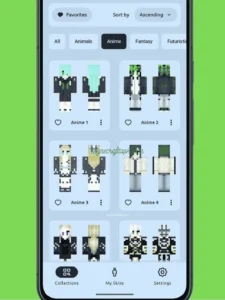
Many players love creating skins on their phones or tablets. Luckily, several Minecraft skin editors work great on mobile, including:
- Skinseed (iOS/Android)
- Skin Editor 3D
- Blockbench (mobile browser version)
These tools make it easy to design or tweak your skins anytime, anywhere.
The Future of Minecraft Skin Editors
As Minecraft continues to grow with mods, RTX support, and new 3D visuals, skin editors are getting smarter too. Exciting trends on the horizon include:
- Animated Skins through mods
- AR-Based Previews for real-world visualization
- Community Collaboration Tools for shared creativity
- AI-Powered Skin Design for faster customization
Whether you’re a casual creator or a pro modder, the future of Minecraft skin editing looks more creative than ever.
Conclusion
Minecraft Skin Editor isn’t just a creative tool—it’s your gateway to self-expression in one of the world’s most beloved games. From simple outfits to detailed character designs, skin editors help make your gameplay more personal and exciting.
As Minecraft evolves, so does the creativity of its players. Whether you want to look like a hero, a wizard, or just wear your favorite hoodie, try a Minecraft Skin Editor today. Unleash your imagination and bring your digital self to life!